

How to Remix Community 3D Models in Neural4D
A community model can give you a starting point for a new design. Use Recreate to load its generation settings into Neural4D Studio, adjust the inputs, and generate a variation for your project.
This workflow creates a new model from the reused settings. To make precise changes to individual vertices or UVs, download the result and continue editing in your 3D software.
1. Choose a community model to recreate
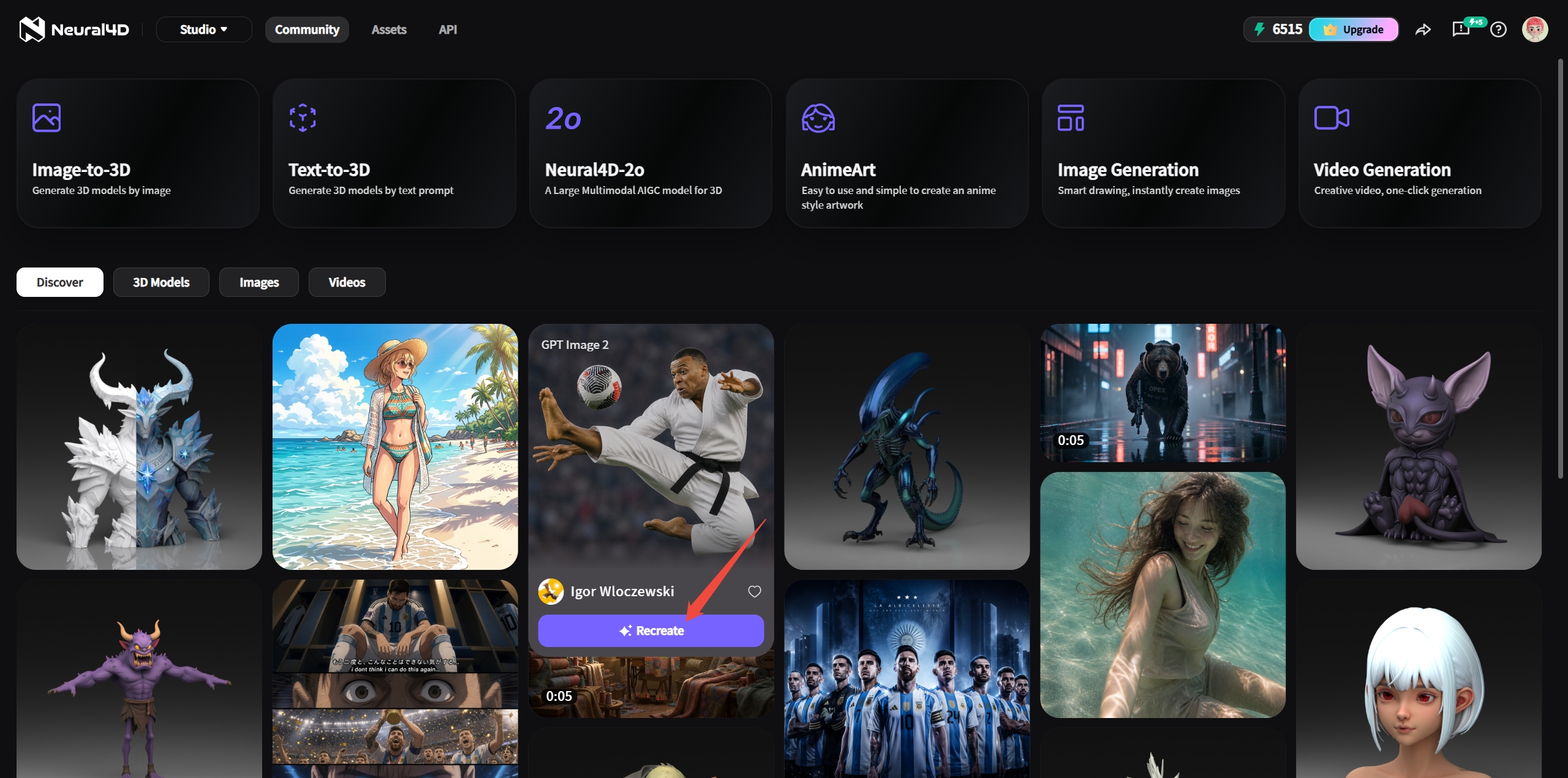
Open Neural4D Studio, browse the community 3D models, and select a thumbnail to open the model details. Choose a source whose overall shape and proportions are close to the asset you want to make.
Rotate the preview and inspect it from several angles. Look beyond the thumbnail: a useful starting model should have the main parts your design needs, such as a chair's legs and backrest or a prop's handle and attachments. Keep the source model URL so you can compare the result and refer to its usage information later.
2. Load the model's settings with Recreate
Click Recreate in the asset panel to load the original generation settings into your Studio workspace. Review the loaded prompt, reference image, and any other available settings before making changes.
Decide which characteristics to keep and which to change. For a first variation, keep the basic object and composition consistent and change one aspect, such as the surface description or visual style. This makes it easier to see how that input affects the new generation.
3. Adjust the inputs and generate a variation
Edit the loaded text prompt, replace the reference image, or adjust the available generation settings to describe the variation you want. For example, keep the description of a metal helmet and change its surface from polished steel to weathered metal.
Keep the object description clear. If you want to preserve a recognizable form, retain details such as the number of main parts, proportions, and defining features instead of replacing the entire prompt with a style phrase.
| Your goal | What to adjust | What to compare |
|---|---|---|
| A different surface appearance | Change the material and wear description in the prompt. | Check the new appearance and whether the underlying shape also changed. |
| A different visual style | Change the style wording while retaining the object description. | Compare silhouette, proportions, and small features. |
| A different shape or composition | Revise the shape description or use a different reference image. | Inspect all views to check that the new parts and proportions work together. |
Review the generation settings, then generate the new model. Prompt changes guide a new generation and may affect both shape and appearance, so inspect the result before deciding it is finished.
4. Compare and refine the generated result
Open the generated variation in your library and compare it with the source. Check the front, back, sides, and underside for missing parts, unwanted connections, surface artifacts, and changes to the silhouette.
If the result needs another pass, return to the inputs and change one factor at a time. Keep a record of the prompt and reference image used for the version you prefer so you have a clear starting point for further variations.
5. Use Remesh if the geometry needs adjustment
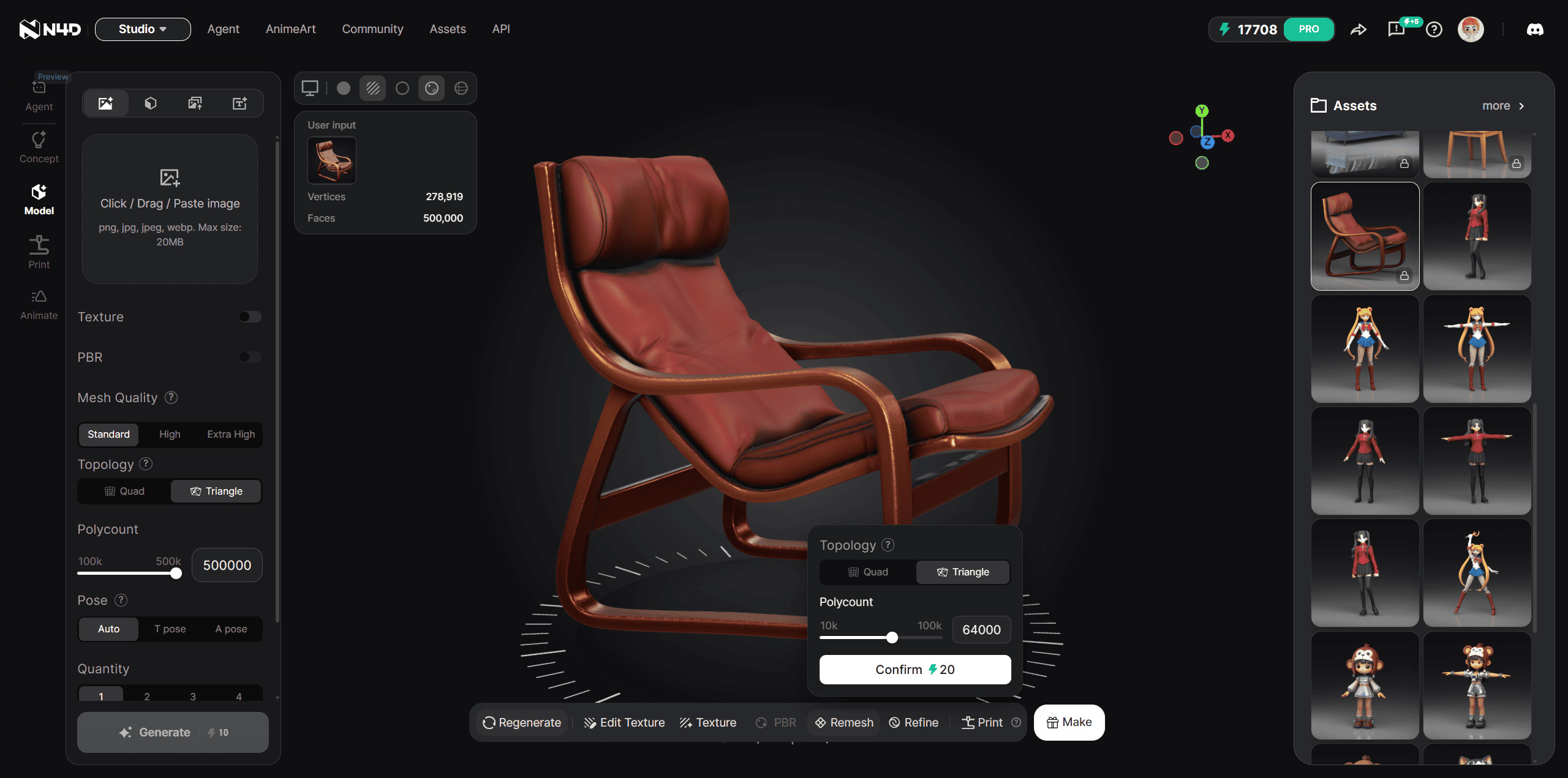
For a generated model with triangle topology, open the model and select Remesh from the bottom toolbar. Choose the output topology and target face count for your next task. A model that already has quad topology cannot be remeshed.
Compare the processed result with the generated version before export. Check thin parts, edges, and the overall silhouette, especially after reducing the face count. If you plan to animate the asset, inspect edge flow and test deformation in your 3D software.
For the full settings and export workflow, follow How to Use Remesh in Neural4D Studio.
6. Download and check the model in your project
Use the model's Download options to select an available format that your destination software supports. Import the file and check scale, orientation, materials, and any separate texture files before placing the asset in your scene.
Keep a copy of the generated model before further editing. Make precise geometry, UV, material, or rigging adjustments in your 3D software as needed for the project. For download guidance, see How to Download 3D Models from the Neural4D Community.
Check usage information before sharing your variation
Before publishing, selling, or delivering a variation to a client, check the Neural4D Terms of Use and any usage information provided with the source model. Keep the source URL and a record of your changes. If permission for the intended use is unclear, contact support@neural4d.com with the model URL and a description of your project.
Frequently asked questions
Does Recreate change the original community model?
No. Recreate loads the source model's generation settings into your Studio workspace so you can generate a separate variation. Your changes apply to the new result, leaving the original community model unchanged.
Why does my recreated model look different from the original?
Recreate starts a new generation using the loaded settings and your changes. It does not duplicate the original mesh. Compare the new shape and materials with the source, then adjust one input at a time if the result has moved away from your intended design.
Why is Remesh unavailable for my model?
Remesh supports triangle-topology models. A model that already has quad topology cannot be remeshed. Check the topology of the generated result before trying again.
Can I publish or sell a remixed community model?
Check the applicable Neural4D Terms of Use and any usage information provided with the source model before publishing or selling a variation. Recreate access does not by itself establish permission for every use. If the permission for your project is unclear, contact support@neural4d.com with the source model URL.
%22%3E%3Cg%3E%3Cpath%20d%3D%22M14.22126%2C2L16.980341%2C2L10.922359%2C8.365314L18%2C17.000000999999997L12.44585%2C17.000000999999997L8.0973005%2C11.7527676L3.1189604%2C17.000000999999997L0.35988006%2C17.000000999999997L6.7777414%2C10.1918821L0%2C2L5.6921029%2C2L9.6207924%2C6.7933583L14.22126%2C2ZM13.255582%2C15.505536L14.785071%2C15.505536L4.88837%2C3.4391145L3.2449181%2C3.4391145L13.255582%2C15.505536Z%22%20fill%3D%22%23ffffff%22%20fill-opacity%3D%221%22%20style%3D%22mix-blend-mode%3Apassthrough%22%2F%3E%3C%2Fg%3E%3C%2Fg%3E%3C%2Fsvg%3E)
%22%3E%3Cg%3E%3Cg%3E%3Cpath%20d%3D%22M17.776579953674315%2C4.238972914697266C18.530987953674316%2C2.8357112146972656%2C17.668764953674316%2C1.0000038146972656%2C17.668764953674316%2C1.0000038146972656C15.728984953674317%2C1.0000038146972656%2C14.327326953674316%2C2.2953194146972655%2C14.327326953674316%2C2.2953194146972655C13.572919953674317%2C1.8635447646972656%2C11.093512553674316%2C1.8635447646972656%2C11.093512553674316%2C1.8635447646972656C11.093512553674316%2C1.8635447646972656%2C8.614197253674316%2C1.8635447646972656%2C7.859790753674316%2C2.2953194146972655C7.859790753674316%2C2.2953194146972655%2C6.4587898536743165%2C1.0000038146972656%2C4.518257353674317%2C1.0000038146972656C4.518257353674317%2C1.0000038146972656%2C3.6561312536743165%2C2.8350313146972654%2C4.410538953674316%2C4.238972914697266C4.410538953674316%2C4.238972914697266%2C2.6862124236743163%2C5.858135714697266%2C3.332825653674316%2C9.312969214697265C3.9408041536743164%2C12.559363814697265%2C6.782133553674316%2C13.415479814697266%2C8.614197253674316%2C13.415479814697266C8.614197253674316%2C13.415479814697266%2C7.859790753674316%2C14.063154814697265%2C7.967603653674316%2C15.142524814697266C7.967603653674316%2C15.142524814697266%2C6.889853453674316%2C15.790198814697266%2C5.812196053674317%2C15.358415814697265C4.734538553674316%2C14.926723814697265%2C4.1956536536743165%2C13.847263814697266%2C4.1956536536743165%2C13.847263814697266C4.1956536536743165%2C13.847263814697266%2C3.1179590536743165%2C12.443964814697265%2C2.0402743556743164%2C12.983694814697266C2.0402743556743164%2C12.983694814697266%2C1.7169677936743164%2C13.307532814697266%2C2.9024282136743165%2C13.847263814697266C2.9024282136743165%2C13.847263814697266%2C3.7645722536743165%2C15.142524814697266%2C4.087878753674316%2C15.898144814697266C4.411195253674316%2C16.653767814697268%2C6.135446553674316%2C17.301444814697266%2C7.860446953674316%2C16.869661814697267L7.860446953674316%2C19.352327814697265C7.860446953674316%2C19.352327814697265%2C7.860446953674316%2C19.568219814697265%2C7.4293847536743165%2C19.676166814697265C6.998322453674317%2C19.784110814697264%2C6.998322453674317%2C20.000003814697266%2C7.213853853674316%2C20.000003814697266L14.974576953674317%2C20.000003814697266C15.190109953674316%2C20.000003814697266%2C15.190109953674316%2C19.784110814697264%2C14.759046953674316%2C19.676166814697265C14.327983953674316%2C19.568219814697265%2C14.327983953674316%2C19.352327814697265%2C14.327983953674316%2C19.352327814697265L14.327983953674316%2C16.869661814697267C14.327983953674316%2C16.869661814697267%2C14.337451953674316%2C15.575053814697265%2C14.327983953674316%2C15.142524814697266C14.304263953674317%2C14.057753814697266%2C13.573576953674316%2C13.415479814697266%2C13.573576953674316%2C13.415479814697266C15.405640953674316%2C13.415479814697266%2C18.246925953674317%2C12.559363814697265%2C18.854893953674317%2C9.312969214697265C19.501579953674316%2C5.858135714697266%2C17.777234953674316%2C4.238972914697266%2C17.776579953674315%2C4.238972914697266L17.776579953674315%2C4.238972914697266Z%22%20fill%3D%22%23ffffff%22%20fill-opacity%3D%221%22%20style%3D%22mix-blend-mode%3Apassthrough%22%2F%3E%3C%2Fg%3E%3C%2Fg%3E%3C%2Fg%3E%3C%2Fsvg%3E)


%22%2F%3E%3C%2Fsvg%3E)

%22%2F%3E%3C%2Fsvg%3E)