

Neural4D's AI Video Generator bridges the gap between text prompts, image references, and dynamic, production-grade video assets. Produce high-fidelity cinematic motion sequences with four AI video engines, engineered for precise temporal coherence, physics-based motion simulation, and optional synchronized native audio.

Choose from Veo 3.1 for high-fidelity realism, Seedance 2.0 for stable complex motion, Seedance 2.0 Fast for faster turnaround, and Grok Imagine for expressive efficient motion.
Generate video outputs from 480P up to 4K, with 4K available on Veo 3.1 and Seedance 2.0. Fine-tune camera layouts across 16:9, 9:16, 1:1, 4:3, or 3:4 aspect ratios seamlessly.

Generate clips with synchronized native audio in the same pass, then export clean high-fidelity MP4 files. Retain crisp edges, motion fidelity, and lighting highlights for post-processing pipelines.

Translate scripts and concepts directly into dynamic layout sequences. Map out camera tracks and character blockings with Seedance 2.0 before rendering.

Generate eye-catching vertical reels (9:16) or square timelines (1:1) to capture user attention and launch digital promotion campaigns in minutes.

Bring static product renders to life with smooth, physics-compliant loops. Showcase details, fabrics, and configurations realistically on e-commerce storefronts.

Render dynamic environments and architectural walk-throughs from initial sketches. Generate rich interactive loops to wow clients during reviews.
Compare the four video models and generation controls to optimize your dynamic media workflow.
| Model | Positioning | 4K | Native Audio |
|---|---|---|---|
| Veo 3.1 | High-fidelity realism | Yes | Yes |
| Seedance 2.0 | Stable complex motion | Yes | Yes |
| Seedance 2.0 Fast | Faster turnaround | No | Yes |
| Grok Imagine | Expressive efficient motion | No | No |
| Generator Feature | Supported Inputs | Output Format | Key Technical Facts |
|---|---|---|---|
| Resolution Controls | 480P, 720P, 1080P, 4K selections | Lossless MP4 | 4K available on Veo 3.1 and Seedance 2.0 |
| Duration Control | Configurable 5s to 15s clips | Lossless MP4 | Zero motion blur, customizable generation quantity |
| Credit System | Model, resolution, duration, audio, quantity | Power credits | Free accounts refill 50 credits every week |
Credit consumption now reflects your generation settings. For video, the cost is calculated from the model, resolution, duration, audio toggle, and quantity you choose, so a short silent draft costs far less than a long 4K render with sound. Free accounts refill 50 Power credits every week.
Looking for other capabilities? Explore All Neural4D Features →
Access the Neural4D Studio dashboard, upload your reference image, and enter your descriptive motion prompt in the text box.
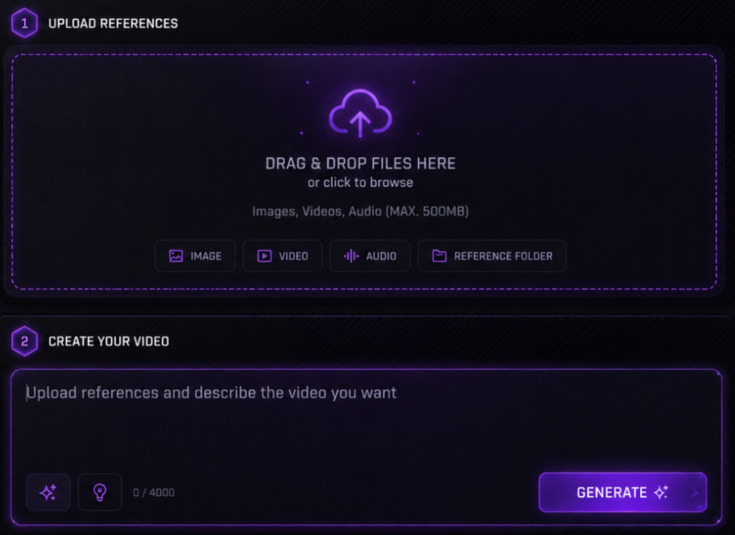
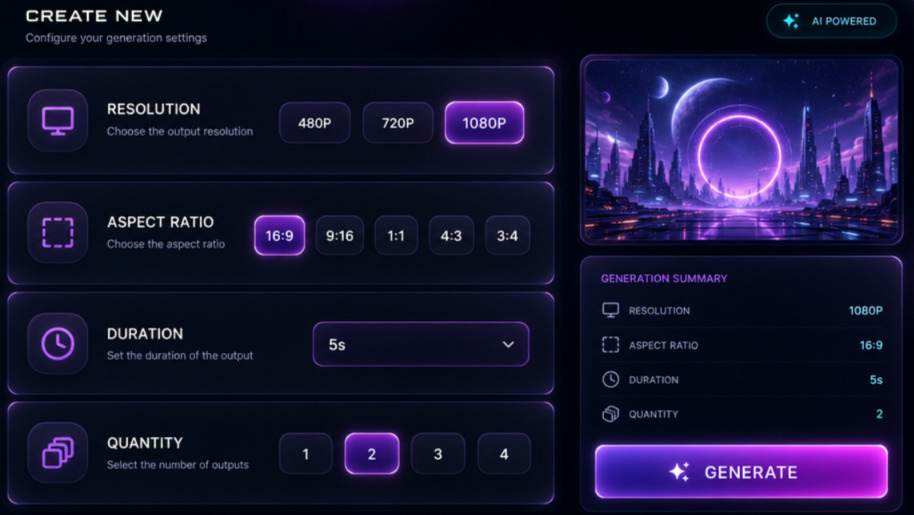
Pick a video model, configure resolution (480P to 4K), canvas aspect ratios (16:9, 9:16, 1:1, 4:3, 3:4), video duration (5 to 15 seconds), a Native Audio toggle, and quantity presets.
Click 'Generate Video' to run your selected model. The system compiles the animation frame sequence with high motion coherence in seconds.
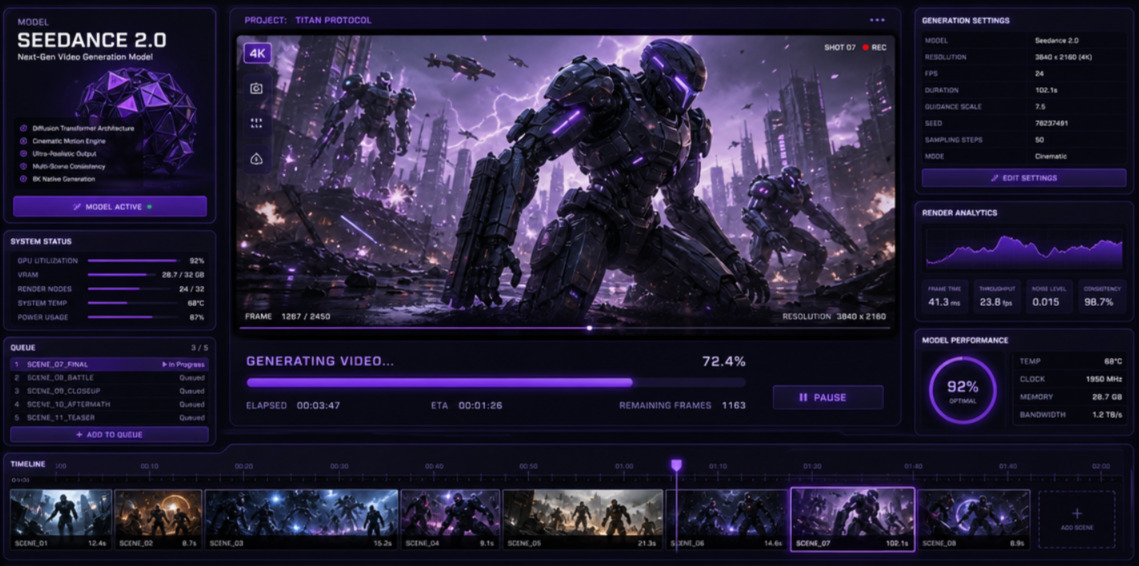
Preview the animation, then export and download your dynamic video file in high-quality MP4 format ready for major editors.

Neural4D runs four AI video models. Veo 3.1 targets high-fidelity realism with native 4K output, Seedance 2.0 handles stable complex motion, Seedance 2.0 Fast delivers faster turnaround, and Grok Imagine focuses on expressive efficient motion.
You can configure models, resolutions (480P, 720P, 1080P, 4K), aspect ratios (16:9, 9:16, 1:1, 4:3, 3:4), durations (ranging from 5 to 15 seconds), a Native Audio toggle, and quantity presets (1 to 4 videos).
Grok Imagine favors expressive, efficient motion and generates silent clips with no 4K tier, which makes it good for fast style tests. Veo 3.1 produces high-fidelity realism with synchronized native audio and 4K output, so it fits final deliverables that need a soundtrack and broadcast-grade resolution.
Yes. Audio is one of the dimensions in the video credit formula, alongside model, resolution, duration, and quantity. A clip rendered with sound costs more than the same clip rendered silent, so disabling audio is a reliable way to cut cost during drafting.
Neural4D AI Video Generator supports exporting high-fidelity videos in MP4 format.
Yes, you can upload reference images (such as character concepts or scene blueprints) alongside text prompts to guide the motion direction and visual style of the generated video.
Yes, paid subscribers own full commercial rights to all generated videos, while free tier users have non-commercial trial rights.

'%3e%3cg%3e%3cpath%20d='M14.22126,2L16.980341,2L10.922359,8.365314L18,17.000000999999997L12.44585,17.000000999999997L8.0973005,11.7527676L3.1189604,17.000000999999997L0.35988006,17.000000999999997L6.7777414,10.1918821L0,2L5.6921029,2L9.6207924,6.7933583L14.22126,2ZM13.255582,15.505536L14.785071,15.505536L4.88837,3.4391145L3.2449181,3.4391145L13.255582,15.505536Z'%20fill='%23ffffff'%20fill-opacity='1'%20style='mix-blend-mode:passthrough'/%3e%3c/g%3e%3c/g%3e%3c/svg%3e)
'%3e%3cg%3e%3cg%3e%3cpath%20d='M17.776579953674315,4.238972914697266C18.530987953674316,2.8357112146972656,17.668764953674316,1.0000038146972656,17.668764953674316,1.0000038146972656C15.728984953674317,1.0000038146972656,14.327326953674316,2.2953194146972655,14.327326953674316,2.2953194146972655C13.572919953674317,1.8635447646972656,11.093512553674316,1.8635447646972656,11.093512553674316,1.8635447646972656C11.093512553674316,1.8635447646972656,8.614197253674316,1.8635447646972656,7.859790753674316,2.2953194146972655C7.859790753674316,2.2953194146972655,6.4587898536743165,1.0000038146972656,4.518257353674317,1.0000038146972656C4.518257353674317,1.0000038146972656,3.6561312536743165,2.8350313146972654,4.410538953674316,4.238972914697266C4.410538953674316,4.238972914697266,2.6862124236743163,5.858135714697266,3.332825653674316,9.312969214697265C3.9408041536743164,12.559363814697265,6.782133553674316,13.415479814697266,8.614197253674316,13.415479814697266C8.614197253674316,13.415479814697266,7.859790753674316,14.063154814697265,7.967603653674316,15.142524814697266C7.967603653674316,15.142524814697266,6.889853453674316,15.790198814697266,5.812196053674317,15.358415814697265C4.734538553674316,14.926723814697265,4.1956536536743165,13.847263814697266,4.1956536536743165,13.847263814697266C4.1956536536743165,13.847263814697266,3.1179590536743165,12.443964814697265,2.0402743556743164,12.983694814697266C2.0402743556743164,12.983694814697266,1.7169677936743164,13.307532814697266,2.9024282136743165,13.847263814697266C2.9024282136743165,13.847263814697266,3.7645722536743165,15.142524814697266,4.087878753674316,15.898144814697266C4.411195253674316,16.653767814697268,6.135446553674316,17.301444814697266,7.860446953674316,16.869661814697267L7.860446953674316,19.352327814697265C7.860446953674316,19.352327814697265,7.860446953674316,19.568219814697265,7.4293847536743165,19.676166814697265C6.998322453674317,19.784110814697264,6.998322453674317,20.000003814697266,7.213853853674316,20.000003814697266L14.974576953674317,20.000003814697266C15.190109953674316,20.000003814697266,15.190109953674316,19.784110814697264,14.759046953674316,19.676166814697265C14.327983953674316,19.568219814697265,14.327983953674316,19.352327814697265,14.327983953674316,19.352327814697265L14.327983953674316,16.869661814697267C14.327983953674316,16.869661814697267,14.337451953674316,15.575053814697265,14.327983953674316,15.142524814697266C14.304263953674317,14.057753814697266,13.573576953674316,13.415479814697266,13.573576953674316,13.415479814697266C15.405640953674316,13.415479814697266,18.246925953674317,12.559363814697265,18.854893953674317,9.312969214697265C19.501579953674316,5.858135714697266,17.777234953674316,4.238972914697266,17.776579953674315,4.238972914697266L17.776579953674315,4.238972914697266Z'%20fill='%23ffffff'%20fill-opacity='1'%20style='mix-blend-mode:passthrough'/%3e%3c/g%3e%3c/g%3e%3c/g%3e%3c/svg%3e)


