

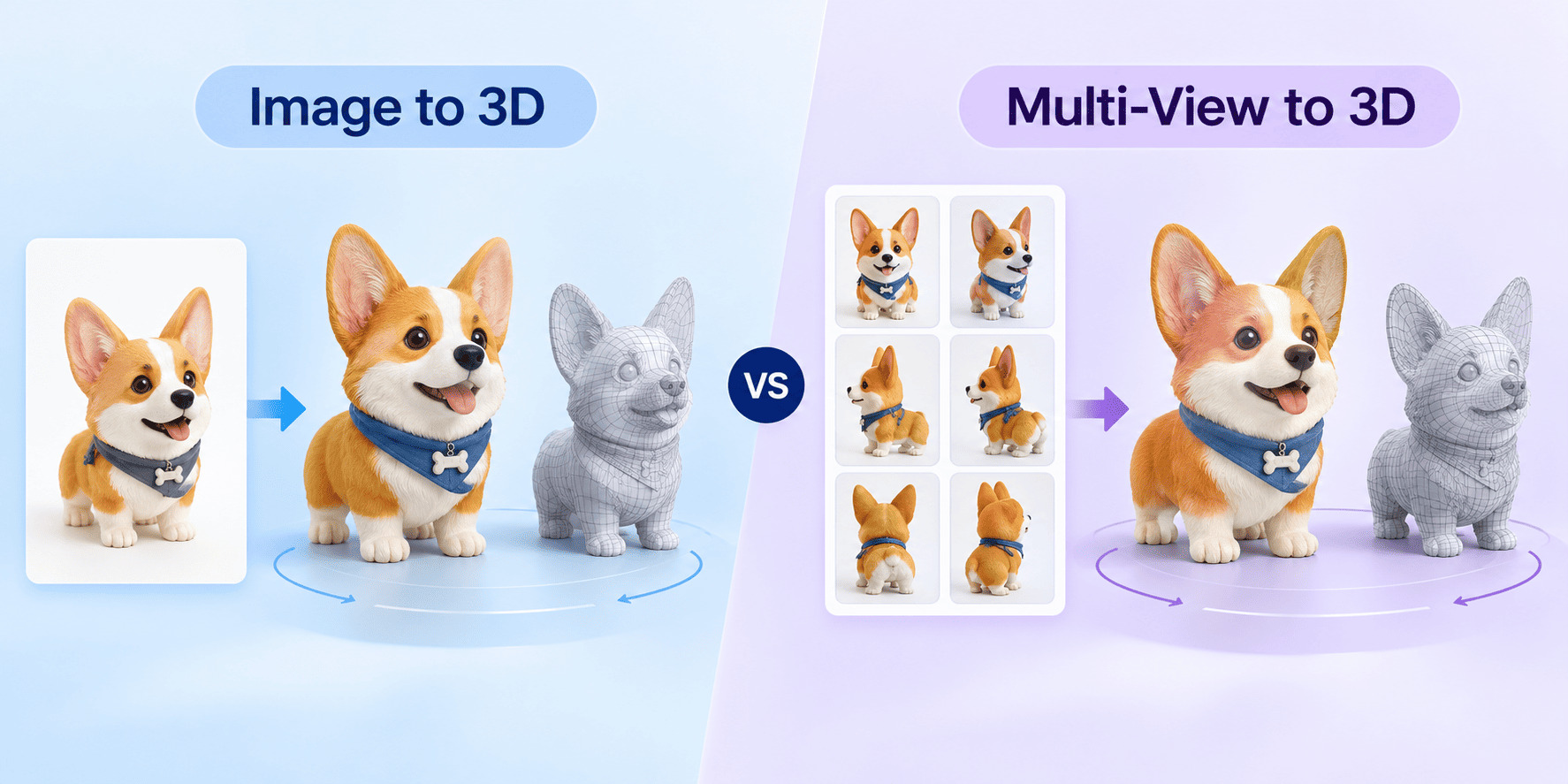
If you only have a single, clear reference image, choose Image to 3D. If you need to accurately reconstruct the back, sides, and overall proportions of an object, and you have multiple consistent views of that same object, choose Multi-View to 3D. However, more images do not automatically guarantee a better model; the images must be perfectly consistent.
The core difference lies in how the AI understands the unseen areas of your object. A single Image to 3D relies heavily on algorithmic inference—the AI "guesses" what the back of your object looks like based on its training data. Multi-View to 3D, on the other hand, uses explicit reference points from multiple angles, allowing the engine to piece together a highly accurate geometric representation of all sides.
Use Image to 3D when you are exploring concepts quickly or have limited source material. It is perfect for turning a single product photo, a quick concept sketch, or a character portrait into a 3D asset in seconds. This method is ideal for background assets or rapid prototyping where absolute precision on the rear side is not critical.
Use Multi-View to 3D when you are working with furniture, product prototypes, or hero assets that require strict verification of the back and side profiles. In the Neural4D Multi-View Studio, the Front and Back images are mandatory, while other directional views can be provided based on your available assets. This ensures the final geometry strictly adheres to your design.
Your 3D model will only be as good as your input images. Issues like heavy occlusion (objects blocking the view), extreme perspective distortion, or cropped borders will confuse the generation engine. Most importantly for Multi-View generation, all images must be consistent. The design version, scale proportions, and the state of the object's moving parts must exactly match across all provided views.
| Project Scenario | Image to 3D | Multi-View to 3D |
|---|---|---|
| Input Required | One single image. | Multiple images assigned to specific directions. |
| Ideal Tasks | Quickly turning a concept sketch or photo into a model. | Explicitly controlling the shape of all sides of an object. |
| Main Limitation | Unseen parts must be inferred by the AI system. | Conflicting visual data across views will ruin results. |
| Preparation Cost | Low. | Higher; requires careful verification of image consistency. |
Whether using single or multiple views, follow these common best practices: ensure flat, neutral lighting (avoid harsh shadows), use a solid neutral background, and maintain high contrast. For Multi-View specifically, double-check that the camera height/angle remains relatively level across all directional shots to avoid conflicting topological data.
Before moving your generated asset into production, inspect the overall silhouette, verify that no thin structural components are missing, check the connections between parts, and review the inferred back structure. If you are preparing the asset for 3D printing, remember to also verify the wall thickness and overall printability within your slicing software.
No. If your multiple views have conflicting lighting, different object states, or mismatched scales, the AI will struggle to resolve the geometry and output a worse model. If you cannot provide consistent multi-view images, a single high-quality image using Image to 3D will yield better results.
Yes. In Neural4D, the Front and Back views are required. You can successfully generate a model using just these two views, although providing Left and Right views will further improve side profile accuracy.
Inconsistent angles will cause "ghosting" or distorted geometry, as the AI tries to blend conflicting structural information. Always strive to capture images from a level, orthographic-like perspective when shooting for multi-view generation.
%22%3E%3Cg%3E%3Cpath%20d%3D%22M14.22126%2C2L16.980341%2C2L10.922359%2C8.365314L18%2C17.000000999999997L12.44585%2C17.000000999999997L8.0973005%2C11.7527676L3.1189604%2C17.000000999999997L0.35988006%2C17.000000999999997L6.7777414%2C10.1918821L0%2C2L5.6921029%2C2L9.6207924%2C6.7933583L14.22126%2C2ZM13.255582%2C15.505536L14.785071%2C15.505536L4.88837%2C3.4391145L3.2449181%2C3.4391145L13.255582%2C15.505536Z%22%20fill%3D%22%23ffffff%22%20fill-opacity%3D%221%22%20style%3D%22mix-blend-mode%3Apassthrough%22%2F%3E%3C%2Fg%3E%3C%2Fg%3E%3C%2Fsvg%3E)
%22%3E%3Cg%3E%3Cg%3E%3Cpath%20d%3D%22M17.776579953674315%2C4.238972914697266C18.530987953674316%2C2.8357112146972656%2C17.668764953674316%2C1.0000038146972656%2C17.668764953674316%2C1.0000038146972656C15.728984953674317%2C1.0000038146972656%2C14.327326953674316%2C2.2953194146972655%2C14.327326953674316%2C2.2953194146972655C13.572919953674317%2C1.8635447646972656%2C11.093512553674316%2C1.8635447646972656%2C11.093512553674316%2C1.8635447646972656C11.093512553674316%2C1.8635447646972656%2C8.614197253674316%2C1.8635447646972656%2C7.859790753674316%2C2.2953194146972655C7.859790753674316%2C2.2953194146972655%2C6.4587898536743165%2C1.0000038146972656%2C4.518257353674317%2C1.0000038146972656C4.518257353674317%2C1.0000038146972656%2C3.6561312536743165%2C2.8350313146972654%2C4.410538953674316%2C4.238972914697266C4.410538953674316%2C4.238972914697266%2C2.6862124236743163%2C5.858135714697266%2C3.332825653674316%2C9.312969214697265C3.9408041536743164%2C12.559363814697265%2C6.782133553674316%2C13.415479814697266%2C8.614197253674316%2C13.415479814697266C8.614197253674316%2C13.415479814697266%2C7.859790753674316%2C14.063154814697265%2C7.967603653674316%2C15.142524814697266C7.967603653674316%2C15.142524814697266%2C6.889853453674316%2C15.790198814697266%2C5.812196053674317%2C15.358415814697265C4.734538553674316%2C14.926723814697265%2C4.1956536536743165%2C13.847263814697266%2C4.1956536536743165%2C13.847263814697266C4.1956536536743165%2C13.847263814697266%2C3.1179590536743165%2C12.443964814697265%2C2.0402743556743164%2C12.983694814697266C2.0402743556743164%2C12.983694814697266%2C1.7169677936743164%2C13.307532814697266%2C2.9024282136743165%2C13.847263814697266C2.9024282136743165%2C13.847263814697266%2C3.7645722536743165%2C15.142524814697266%2C4.087878753674316%2C15.898144814697266C4.411195253674316%2C16.653767814697268%2C6.135446553674316%2C17.301444814697266%2C7.860446953674316%2C16.869661814697267L7.860446953674316%2C19.352327814697265C7.860446953674316%2C19.352327814697265%2C7.860446953674316%2C19.568219814697265%2C7.4293847536743165%2C19.676166814697265C6.998322453674317%2C19.784110814697264%2C6.998322453674317%2C20.000003814697266%2C7.213853853674316%2C20.000003814697266L14.974576953674317%2C20.000003814697266C15.190109953674316%2C20.000003814697266%2C15.190109953674316%2C19.784110814697264%2C14.759046953674316%2C19.676166814697265C14.327983953674316%2C19.568219814697265%2C14.327983953674316%2C19.352327814697265%2C14.327983953674316%2C19.352327814697265L14.327983953674316%2C16.869661814697267C14.327983953674316%2C16.869661814697267%2C14.337451953674316%2C15.575053814697265%2C14.327983953674316%2C15.142524814697266C14.304263953674317%2C14.057753814697266%2C13.573576953674316%2C13.415479814697266%2C13.573576953674316%2C13.415479814697266C15.405640953674316%2C13.415479814697266%2C18.246925953674317%2C12.559363814697265%2C18.854893953674317%2C9.312969214697265C19.501579953674316%2C5.858135714697266%2C17.777234953674316%2C4.238972914697266%2C17.776579953674315%2C4.238972914697266L17.776579953674315%2C4.238972914697266Z%22%20fill%3D%22%23ffffff%22%20fill-opacity%3D%221%22%20style%3D%22mix-blend-mode%3Apassthrough%22%2F%3E%3C%2Fg%3E%3C%2Fg%3E%3C%2Fg%3E%3C%2Fsvg%3E)


%22%2F%3E%3C%2Fsvg%3E)

%22%2F%3E%3C%2Fsvg%3E)