

Transform Multiple Images into 3D Models Instantly
Upload up to 10 images at once and let our AI generate individual 3D models simultaneously. Accelerate your production pipeline with watertight meshes.
Experience unparalleled efficiency with our batch processing capabilities.
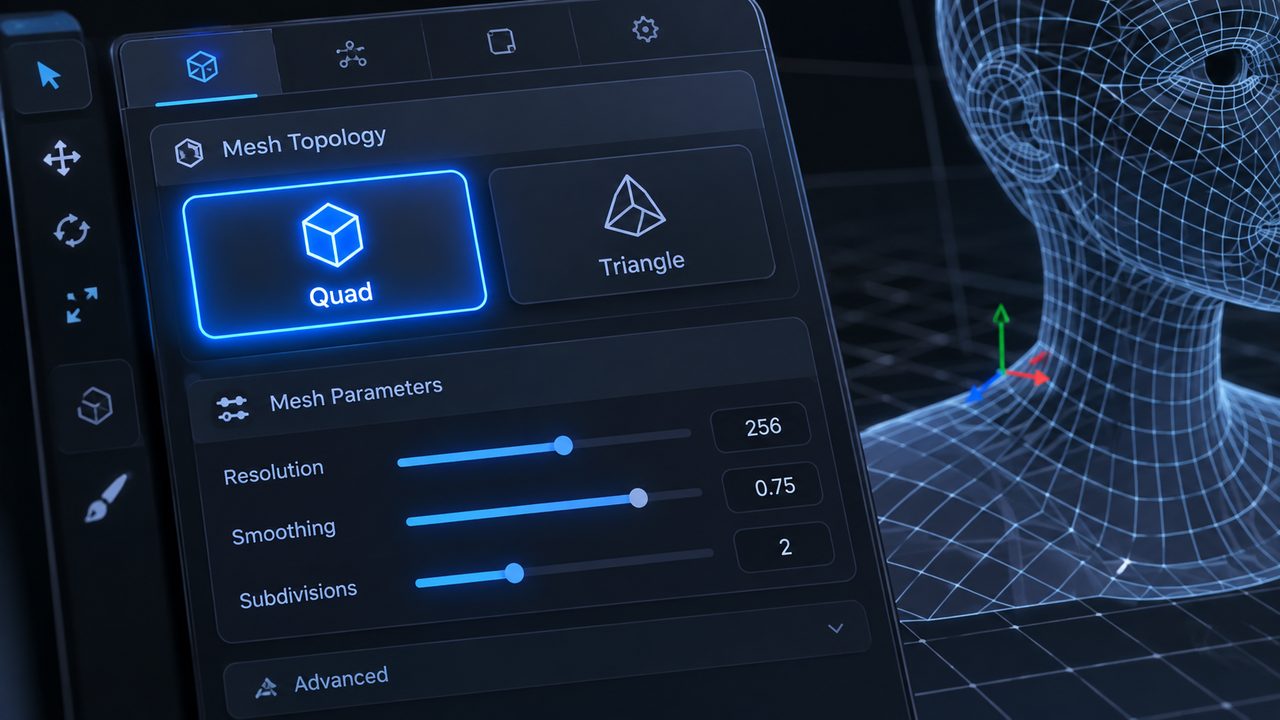
Select Quad or Triangle topology globally for all models in your batch to ensure standardized asset quality.

Every generated model comes fully equipped with high-fidelity PBR textures ready for rendering.

Process up to 10 images simultaneously with our Direct3D-S2 algorithm for gigascale efficiency.
Accelerate your asset creation pipeline across major industries.

Convert multiple angles of furniture design sketches into 3D prototypes rapidly to build digital showrooms.

Generate watertight mesh components in bulk. Perfect for slicing software and large-scale 3D printing arrays.

Translate entire batches of concept art into production-ready props and environment objects instantly.

Produce 3D showcase models for entire product lines simultaneously, reducing manual modeling costs.
Streamline your workflow from multiple images to 3D assets in three simple steps.
Easily drag and drop or paste up to 10 distinct images into the designated upload zone. We support JPG, JPEG, PNG, and WebP formats up to 20MB per file.

Configure the output settings for your batch. Choose between Quad or Triangle topology to best suit your downstream requirements for animation or detailing.
Start the process and watch as our AI creates independent 3D models for each image. Once completed, export your watertight assets in formats like GLB, OBJ, or FBX.
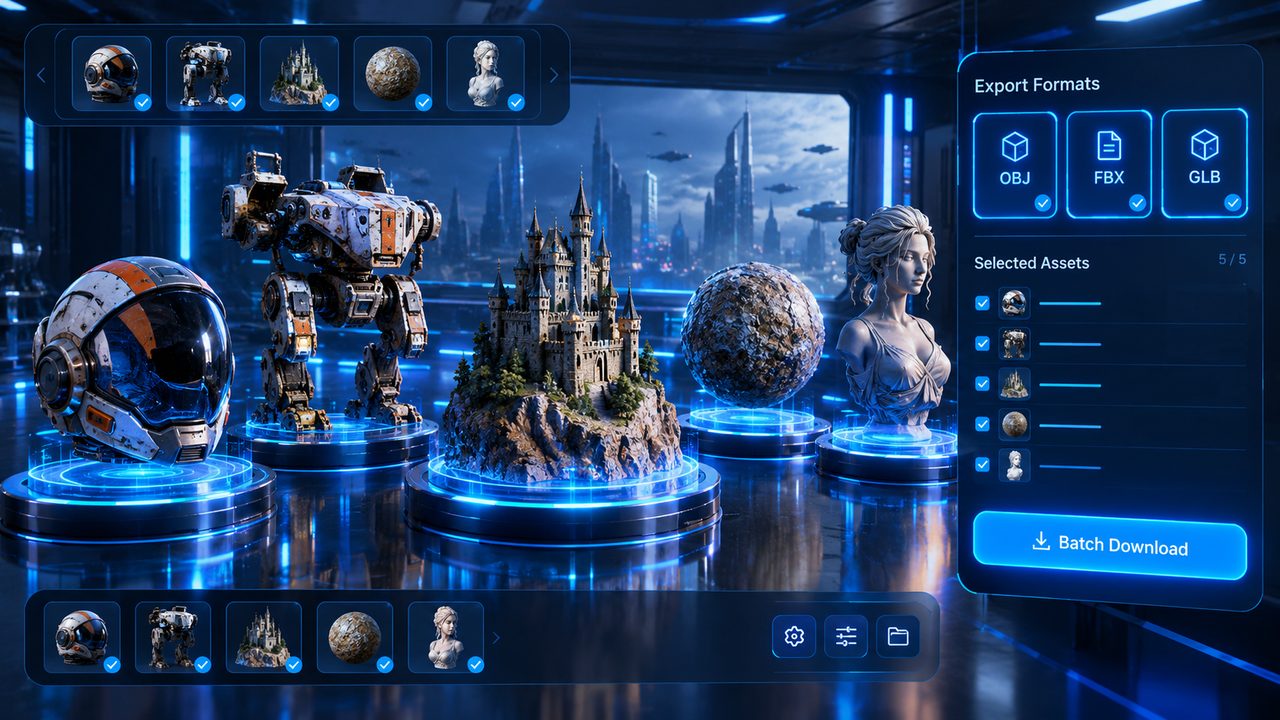

You can upload and process up to 10 independent images simultaneously in a single batch operation. Each image is reconstructed concurrently on isolated GPU threads to deliver distinct, high-fidelity 3D models.
All generated 3D assets can be exported in industry-standard formats including OBJ, FBX, GLB, USDZ, STL, and BLEND. Each export includes baked PBR texture channels (Albedo, Roughness, Metallic, and Normal).
Neural4D generates high-density triangular meshes engineered for structural integrity. This ensures continuous surface continuity and watertight manifold geometries ideal for physical 3D printing and real-time rendering.
No. Every uploaded photo in a batch can feature completely different subjects, product categories, or conceptual designs. Our Direct3D volumetric engine processes each asset independently without cross-interference.
Yes. The volumetric reconstruction pipeline guarantees watertight manifold geometry with zero non-manifold edges, self-intersections, or open boundaries, making your exported STL or OBJ files instantly sliceable in standard slicers.
Thanks to concurrent volumetric inference, generating a full batch of 10 independent 3D models typically finishes within 60 to 90 seconds, providing up to 10x workflow acceleration over sequential single-asset rendering.
%22%3E%3Cg%3E%3Cpath%20d%3D%22M14.22126%2C2L16.980341%2C2L10.922359%2C8.365314L18%2C17.000000999999997L12.44585%2C17.000000999999997L8.0973005%2C11.7527676L3.1189604%2C17.000000999999997L0.35988006%2C17.000000999999997L6.7777414%2C10.1918821L0%2C2L5.6921029%2C2L9.6207924%2C6.7933583L14.22126%2C2ZM13.255582%2C15.505536L14.785071%2C15.505536L4.88837%2C3.4391145L3.2449181%2C3.4391145L13.255582%2C15.505536Z%22%20fill%3D%22%23ffffff%22%20fill-opacity%3D%221%22%20style%3D%22mix-blend-mode%3Apassthrough%22%2F%3E%3C%2Fg%3E%3C%2Fg%3E%3C%2Fsvg%3E)
%22%3E%3Cg%3E%3Cg%3E%3Cpath%20d%3D%22M17.776579953674315%2C4.238972914697266C18.530987953674316%2C2.8357112146972656%2C17.668764953674316%2C1.0000038146972656%2C17.668764953674316%2C1.0000038146972656C15.728984953674317%2C1.0000038146972656%2C14.327326953674316%2C2.2953194146972655%2C14.327326953674316%2C2.2953194146972655C13.572919953674317%2C1.8635447646972656%2C11.093512553674316%2C1.8635447646972656%2C11.093512553674316%2C1.8635447646972656C11.093512553674316%2C1.8635447646972656%2C8.614197253674316%2C1.8635447646972656%2C7.859790753674316%2C2.2953194146972655C7.859790753674316%2C2.2953194146972655%2C6.4587898536743165%2C1.0000038146972656%2C4.518257353674317%2C1.0000038146972656C4.518257353674317%2C1.0000038146972656%2C3.6561312536743165%2C2.8350313146972654%2C4.410538953674316%2C4.238972914697266C4.410538953674316%2C4.238972914697266%2C2.6862124236743163%2C5.858135714697266%2C3.332825653674316%2C9.312969214697265C3.9408041536743164%2C12.559363814697265%2C6.782133553674316%2C13.415479814697266%2C8.614197253674316%2C13.415479814697266C8.614197253674316%2C13.415479814697266%2C7.859790753674316%2C14.063154814697265%2C7.967603653674316%2C15.142524814697266C7.967603653674316%2C15.142524814697266%2C6.889853453674316%2C15.790198814697266%2C5.812196053674317%2C15.358415814697265C4.734538553674316%2C14.926723814697265%2C4.1956536536743165%2C13.847263814697266%2C4.1956536536743165%2C13.847263814697266C4.1956536536743165%2C13.847263814697266%2C3.1179590536743165%2C12.443964814697265%2C2.0402743556743164%2C12.983694814697266C2.0402743556743164%2C12.983694814697266%2C1.7169677936743164%2C13.307532814697266%2C2.9024282136743165%2C13.847263814697266C2.9024282136743165%2C13.847263814697266%2C3.7645722536743165%2C15.142524814697266%2C4.087878753674316%2C15.898144814697266C4.411195253674316%2C16.653767814697268%2C6.135446553674316%2C17.301444814697266%2C7.860446953674316%2C16.869661814697267L7.860446953674316%2C19.352327814697265C7.860446953674316%2C19.352327814697265%2C7.860446953674316%2C19.568219814697265%2C7.4293847536743165%2C19.676166814697265C6.998322453674317%2C19.784110814697264%2C6.998322453674317%2C20.000003814697266%2C7.213853853674316%2C20.000003814697266L14.974576953674317%2C20.000003814697266C15.190109953674316%2C20.000003814697266%2C15.190109953674316%2C19.784110814697264%2C14.759046953674316%2C19.676166814697265C14.327983953674316%2C19.568219814697265%2C14.327983953674316%2C19.352327814697265%2C14.327983953674316%2C19.352327814697265L14.327983953674316%2C16.869661814697267C14.327983953674316%2C16.869661814697267%2C14.337451953674316%2C15.575053814697265%2C14.327983953674316%2C15.142524814697266C14.304263953674317%2C14.057753814697266%2C13.573576953674316%2C13.415479814697266%2C13.573576953674316%2C13.415479814697266C15.405640953674316%2C13.415479814697266%2C18.246925953674317%2C12.559363814697265%2C18.854893953674317%2C9.312969214697265C19.501579953674316%2C5.858135714697266%2C17.777234953674316%2C4.238972914697266%2C17.776579953674315%2C4.238972914697266L17.776579953674315%2C4.238972914697266Z%22%20fill%3D%22%23ffffff%22%20fill-opacity%3D%221%22%20style%3D%22mix-blend-mode%3Apassthrough%22%2F%3E%3C%2Fg%3E%3C%2Fg%3E%3C%2Fg%3E%3C%2Fsvg%3E)


%22%2F%3E%3C%2Fsvg%3E)

%22%2F%3E%3C%2Fsvg%3E)